![Logo - Bitwage-2.png]](https://support.bitwage.com/hs-fs/hubfs/Logo%20-%20Bitwage-2.png?height=40&name=Logo%20-%20Bitwage-2.png)
Who this is for
Company admins, HR, Finance, and Payroll operators who need to:
- Pay workers/contractors across countries
- Offer flexible payout options (bank, crypto, or split)
- Track payment status and export records for reconciliation
How Bitwage works (high level)
1) Set up your company workspace
Once you’re in, you’ll land on Dashboard, where you can access the main flows: Recipients, Payroll, Allocations, and Payers.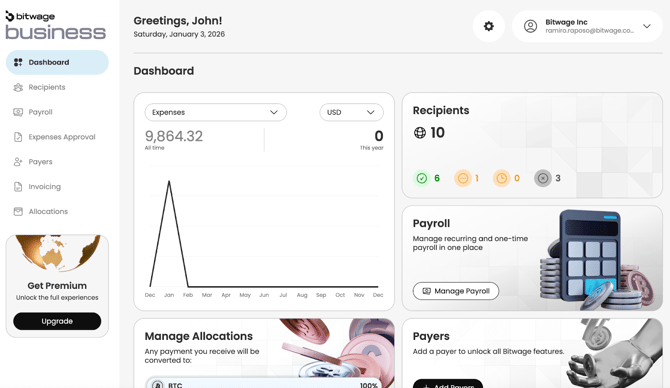
2) Add recipients (who you’re paying)
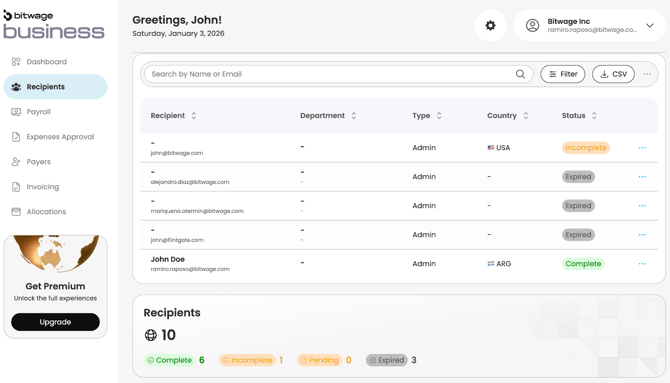
Go to Recipients to add employees/contractors and invite them to complete their payout setup.
From the Recipients page, you can see:
- Recipient email/name
- Country
- Status (ex: Complete, Incomplete, Pending, Expired)
3) Recipients choose how they get paid (Allocations)
Recipients can set up how they want to receive funds:
- 100% local currency to a bank account
- 100% crypto to a wallet
- A mix split by percentage (Allocations)
As a company, you can reference this as part of your payroll/contractor payment process, and direct recipients to finish setup if they’re “Incomplete.”
4) Run payroll or pay contractors/invoices
Go to Payroll to create and manage recurring or one-time pay runs. You’ll also be able to view:
- Payroll history
- Funding method
- Status
5) Track payment status and download records
Bitwage provides visibility into the lifecycle of each pay run/payment (created → processing → fulfilled/completed, etc.). You can filter, search, and export results to support finance ops and reconciliation.
Where to find things in the Bitwage Business dashboard
- Dashboard: quick overview + shortcuts to key actions
- Recipients: add/invite people you pay + monitor setup status
- Payroll: create pay runs, see history, export CSV
- Invoicing: manage contractor invoice workflows (if enabled)
- Allocations: manage payout preferences (recipient payout splits)
- Payers: set up funding/payer details (required to run payments)
- Expenses Approval: approve expense-related flows (if used in your org)
Common questions
What happens if a recipient hasn’t completed setup?
You’ll typically see them as Incomplete in Recipients. In that case, they may not be payable until they finish their receiving setup (bank/wallet + allocation).
Can we run one-time payments and recurring payroll?
Yes—Bitwage supports managing recurring and one-time payroll from Payroll (as shown in your UI).
How do we know a payment is done?
Use Payroll → History and open the payroll/payment detail. Statuses like Fulfilled indicate completion (status labels may vary by flow).
Next articles to read
- A2: Typical setup timeline: signup → first successful payment
- A3: What information do I need before I start?
- C1: How to add a worker/contractor and send an invite
- C4: Payment statuses explained
Suggested screenshots to embed in this article (A1)
- Dashboard overview (shows shortcuts to Recipients/Payroll/Allocations/Payers)
- Recipients list (shows status chips: Complete/Incomplete/Pending/Expired)
- Payroll history (shows funding method + status + totals)
If you want, paste your preferred tone (more formal vs more friendly), and I’ll rewrite this article in your exact Bitwage Help Center voice + add short image captions for each screenshot.